
Find it your way.
Search by title, singer or song code. Keep personal song folders alongside the default library.
FOR ANDROID MOBILE
Find your favorite. Build your queue.
Bring your voice to the spotlight.
VideokeBoss brings song search, synchronized lyrics and your personal music collection together on Android.
Android 8.0+ · Direct APK download · Personal use
LESS SEARCHING. MORE SINGING.
Keep the music organized, the next song ready, and the words in view.
Search by title, singer or song code. Keep personal song folders alongside the default library.
Add songs to your queue, select batches from your library, and revisit songs through your history.
Follow synchronized lyrics, play supported MIDI and recorded formats, and choose your favorite SoundFont.
YOUR MUSIC, WITH YOU
Find songs, build your queue and follow the lyrics on your Android phone or tablet. Bring your personal music and SoundFont folders along.
Default-library activation requires an eligible hardware-backed device.
TAKE THE MIC
The official production APK, delivered directly from VideokeBoss.
For Android phones and tablets.
Download mobile APKProduction APK · Install from your browser using Android’s system installer.
A FEW STEPS TO YOUR FIRST SONG
Download the mobile APK. Allow installation from your browser when Android asks, then confirm in the system installer.
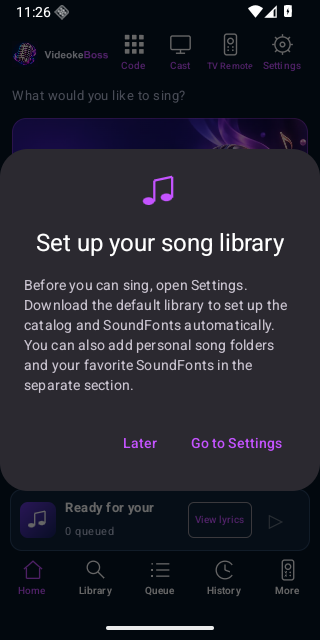
Open Settings and choose Download default library. Read the MIDI and SoundFont terms and disclaimer, check the agreement box, and continue.
After eligible-device activation and library setup, search for a song and add it to your queue. You can also connect your own music and SoundFont folders.
Default setup requires internet, about 1.83 GiB of downloads and approximately 4.5 GiB of free storage. Once setup is complete, library playback can work offline.
BEFORE YOU PRESS PLAY
No. Default-library activation requires supported hardware-backed attestation and a locked, verified device. Some older, modified or non-Google devices may not qualify. Android 8.0 is the minimum app version, not a guarantee of activation.
No. The default MIDI catalog and SoundFonts are downloaded separately after you accept the terms. Your own supported songs can be added through personal folders.
Yes. Settings includes separate personal music and SoundFont folders. Recorded audio can play without a SoundFont; MIDI playback needs a compatible SoundFont.
Internet is required for initial setup, activation and updates. Installed library playback can work offline. Chromecast features use your local network.
Use Settings → App updates to check for a new signed release. Downloads are verified before Android asks you to confirm installation. Keep the same production signing identity and update in place to preserve app data.
The default library is intended for personal, non-commercial use. VideokeBoss does not own the third-party MIDI files or SoundFonts. See the complete terms and disclaimer; online availability does not grant copyright permission.